HomeGrid Stack'd Series Controller | Quick Service Reference
⚠️ Turn OFF the BMS using the front power button and disable the DC battery breaker at the inverter. The internal busbar and DC terminals may remain energized from other sources. HomeGrid recommends that a qualified technician isolate all applicable sources and verify absence of voltage with a properly rated meter before accessing the enclosure. Do not touch exposed conductors. ⚠️
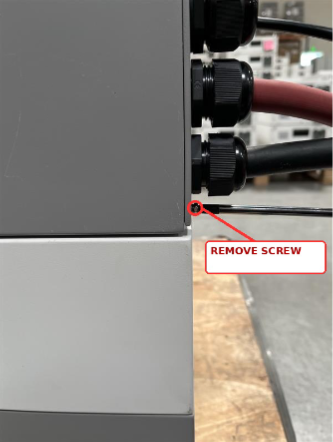
STEP 1 Locate and remove the retaining screw
The screw is below the electrical wiring to the side of the BMS side panel. Older units may also have a retaining screw above the
wiring; remove it if present.
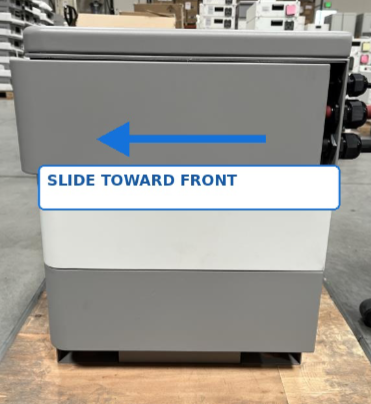
STEP 2 Slide the side panel toward the front of the BMS
This disengages the panel from its retaining peg. Do not pry the panel outward while it is still hooked.
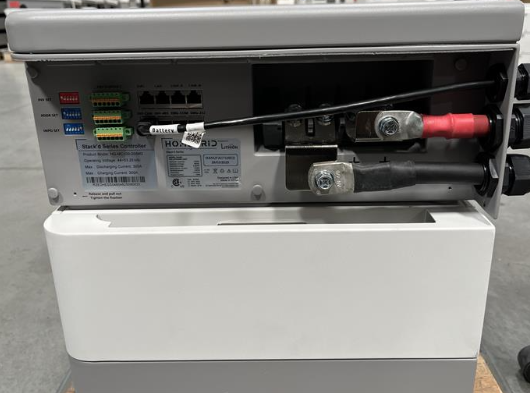
STEP 3 Pull the panel straight outward
Once unhooked, carefully remove the panel without disturbing the electrical cables or connections. This will expose the access view for the BMS.
Reinstallation: Align the panel with the retaining peg, slide it back into its secured position, and reinstall all retaining
screws. Confirm the cover is seated correctly before restoring power.
If you have any questions, please take photos and forward them to support@lithionbattery.com.
Was this article helpful?
That’s Great!
Thank you for your feedback
Sorry! We couldn't be helpful
Thank you for your feedback
Feedback sent
We appreciate your effort and will try to fix the article